Quick Answer
There is no single best smart bulb for every home. Choose Wi-Fi bulbs for straightforward direct control, Bluetooth bulbs for simple nearby control, and hub-based bulbs for larger systems and more dependable automations. Then verify fixture fit, brightness, dimming, app and assistant compatibility, privacy terms, and the full setup cost before buying.
Definitions
Wi-Fi smart bulb
A bulb that connects directly to a home Wi-Fi network, usually through a companion app, without requiring a separate hub.
Bluetooth smart bulb
A bulb controlled primarily over Bluetooth from a nearby phone or compatible device; some models also support another connection method or hub.
Hub-based smart bulb
A bulb that communicates through a dedicated bridge or hub, which connects it to the home network and smart-home controls.
Lumens
A measure of visible light output. Higher lumens generally mean a brighter bulb, although fixture shade, room size and placement also affect perceived brightness.
Tunable white
A bulb feature that allows adjustment across a range of white colour temperatures, from warmer to cooler light.
RGB bulb
A bulb that can produce coloured light using red, green and blue channels, often alongside some white-light settings.
Ecosystem lock-in
The practical difficulty or cost of moving bulbs, automations, accessories or routines from one smart-home platform to another.
Best Smart Bulbs: Start With the Setup, Not the Brand
The best smart bulb is the one that suits the room, the fixture and the way you want to live with it. A bulb that works well for a bedside lamp may be a poor fit for a bright kitchen ceiling light or a protected outdoor fixture. Before comparing colour effects or app features, establish what the bulb needs to do and whether it can physically and digitally fit into your home.
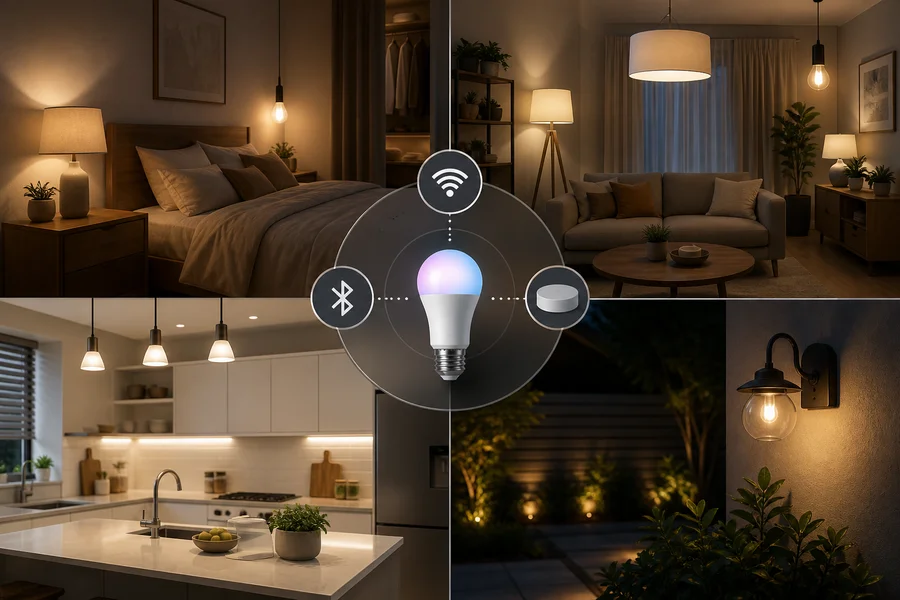
Most smart bulbs use one of three approaches: direct Wi-Fi, Bluetooth or a dedicated hub. Each can be useful, but the right choice depends on the number of bulbs you plan to use, the strength of your network, the controls you prefer and how important routines are to you.
Product specifications can change, so check the current listing and manufacturer documentation for socket, voltage, dimmer, app, hub and voice-assistant compatibility before purchase.
- Start with the room and primary activity.
- Confirm the bulb fits the fixture safely and appropriately.
- Choose a connection type before paying for features you may not use.
A Practical Shortlist: Wi-Fi, Bluetooth, or Hub-Based
Wi-Fi bulbs connect directly to your home network and are often the simplest route for a small setup. They can be convenient when you want app or voice control without purchasing another device, but their experience depends on network coverage, supported Wi-Fi bands and ongoing app support.
Bluetooth bulbs are a practical option for nearby, lower-complexity control. They may place fewer demands on the home network, but range can be limited and remote access may require an additional device, bridge or platform-specific setup.
Hub-based bulbs communicate through a dedicated bridge or hub. This can make sense for homes with many lights, grouped rooms and regular automations. The trade-off is a higher initial cost and another component to set up and maintain.
- Setup effort: Wi-Fi is often direct; Bluetooth is usually local; hub-based systems add a bridge.
- Remote control: verify whether it works from outside the home and what it requires.
- Scale: a hub can be useful when many bulbs, rooms and routines are involved.
- Reliability: assess network reach, hub placement and the product's stated behaviour during outages.
- Offline behaviour: do not assume local control or automations will remain available without internet.
- Total cost: include any hub, bridge, compatible switch or accessory.
Check Compatibility Before Comparing Features
Physical compatibility comes first. Check the socket type, bulb shape, dimensions, voltage requirements and available clearance inside the fixture. A decorative globe or candle shape can alter the look of a room, but only if it fits the lamp or fitting properly. Also confirm any restrictions for enclosed fixtures and whether the bulb is rated for the intended indoor or outdoor setting.
Do not assume a smart bulb will work with an existing wall dimmer. App-based dimming is different from electrical dimmer compatibility. A wall dimmer can interrupt power or cause unreliable behaviour unless both the bulb and the control are specifically compatible.
Digital compatibility matters too. Confirm phone operating-system support, app availability, account requirements, supported Wi-Fi band, network reach, hub needs and integration with your preferred voice assistant or smart-home platform.
- Verify socket, bulb dimensions, voltage and fixture enclosure restrictions.
- Check whether a wall dimmer is supported; do not rely on app dimming alone.
- Confirm app, phone, account, network and hub requirements.
- Check assistant support and whether all features need a particular platform.
- For outdoor use, verify the product rating and use a suitably protected fixture.
Compare Brightness, Colour, and Dimming by Room
Compare lumens rather than wattage when judging brightness. Lumens indicate visible light output, but the amount of useful light in a room also depends on ceiling height, shade material, fixture direction, room size and whether the bulb is the main light or part of a layered scheme.
Colour temperature changes the character of white light. Warmer settings can feel appropriate for winding down, while neutral or cooler settings may make task areas easier to see. There is no universally correct setting: a kitchen, reading corner and bedroom can each call for different priorities.
Tunable white is often the most broadly useful feature for everyday lighting because it lets you adapt white light over the day. RGB bulbs add coloured scenes for accent or mood lighting, but colour effects do not replace a sufficiently bright, comfortable white light source for cooking, reading or detailed work.
- Use lumens to compare brightness, then account for the fixture and room.
- Choose warm, neutral or cooler white according to the activity and ambience you want.
- Prioritise tunable white for flexible daily lighting and routines.
- Choose RGB when coloured accents are a real part of your intended use.
- Check the dimming range, lowest usable brightness and transition smoothness.
- Confirm that colour and white modes remain useful when dimmed.
Controls, Automations, and Everyday Convenience
The most satisfying smart-light setup gives you a simple way to use it every day. Consider whether you want app control, voice commands, physical controls, schedules, scenes, grouping, geofencing, motion triggers or sunrise and sunset routines. A feature is only valuable if the household will use it comfortably.
Wall switches require special thought. When a switch cuts power to a smart bulb, the bulb cannot receive commands until power is restored. If household members naturally use the switch, assess the bulb's power-on behaviour and whether compatible physical controls or routines would make the system easier to live with.
Automations may run through a hub, a cloud service or local controls depending on the product and platform. Check what works during an internet interruption, how multi-user access is handled, and how difficult it would be to restore routines after changing a router, phone or account.
- Decide which controls must be available without opening a phone.
- Check physical-switch behaviour before installing bulbs in shared spaces.
- Review schedules, scenes, groups and sensor-based automation options.
- Verify whether remote access and routines depend on cloud services.
- Consider guest access, household sharing and firmware-update management.
Connectivity, Privacy, and Ecosystem Trade-Offs
A connected bulb can involve an app account, device permissions, cloud services and firmware updates. Review the manufacturer's privacy policy, account requirements, stated data practices and update approach before committing to a larger system. These details can matter as much as colour options when lights are used throughout the home.
Use a strong, unique password for the account and follow normal home-network security practices. Wi-Fi, Bluetooth and hub-based systems each have different setup and management considerations, so it is more useful to check the specific product and platform than to assume any one connection type is automatically secure or private.
Also look beyond the first installation. Remote control, voice commands, notifications and automations may depend on cloud services. Offline operation is product-specific, and moving to another ecosystem later may mean replacing hardware or rebuilding routines.
- Read privacy, permissions, account and update information before purchase.
- Use a unique account password and normal home-network safeguards.
- Verify whether remote control or automations need cloud access.
- Treat offline operation as a feature to confirm, not an assumption.
- Consider the practical cost of changing platforms later.
Compare Total Cost and Long-Term Value
Compare the whole system cost, not just the price of one bulb. Include every bulb required for the room, any bridge or hub, compatible accessories and the likely cost of expanding the setup later. A straightforward setup may be better value than a feature-rich system that does not suit your control preferences.
Energy use should be assessed through the stated power rating, comparable light output and your own usage pattern. Smart controls can help you schedule lights and avoid unnecessary run time, but no fixed saving can be assumed across every home.
Long-term value can also come from dependable routines, comfortable dimming, useful colour quality, broader integrations, clear warranty terms and continued app support. A premium option is not automatically the best choice; it may be worthwhile only when those benefits match your needs.
- Add the cost of bulbs, hubs, bridges and necessary accessories.
- Compare stated power use alongside expected hours of operation.
- Review the stated lifespan, warranty and replacement policy.
- Consider support for updates, integrations and future expansion.
- Weigh ecosystem lock-in against the convenience of a unified system.
Room-by-Room Smart Bulb Decision Paths
For a bedroom, prioritise comfortable warm light, smooth low-end dimming and routines that support your usual waking or winding-down schedule. Tunable white can be more useful than RGB for everyday use. Choose controls that do not require reaching for a phone when you are ready to rest.
For a living room, grouped bulbs, scenes, dimming and voice control can be valuable. Tunable white helps a room move from daytime activity to evening relaxation, while RGB can be an optional accent feature. Ensure the chosen bulbs still provide enough usable white light for the space.
For a kitchen, prioritise brightness, clear usable white light and reliable controls for food preparation and cleaning. Colour effects can be enjoyable, but they are not a substitute for appropriate task lighting. In an outdoor area, check the environmental rating, fixture protection, temperature limits and network reach before considering routines or colour.
- Bedroom path: identify sleep and reading needs, choose dimming and tunable white, then select convenient controls.
- Living-room path: plan groups and scenes, confirm sufficient white light, then add RGB only if desired.
- Kitchen path: begin with visibility and brightness, confirm fixture fit, then consider routines or voice control.
- Outdoor path: verify rating and protected installation context, test network reach, then assess schedules or motion routines.
- For every room: identify the activity, choose light quality, select connection type, verify compatibility and compare total cost.
Smart Bulb Buying Checklist
Use this checklist to narrow your options before shopping. It keeps practical fit and daily usability ahead of novelty features, and it helps you compare different smart-bulb systems on the same basis.
- Room and use: ambient, task, routine or accent lighting.
- Physical fit: socket, shape, dimensions, voltage, enclosure and environmental suitability.
- Light output: lumens, dimming range, colour temperature, tunable white, RGB and colour-quality information where provided.
- Connection: Wi-Fi, Bluetooth or hub; network band, range, remote control and offline behaviour.
- Controls: app, voice assistant, schedules, scenes, groups, switch behaviour and automation support.
- Ownership: privacy policy, account needs, firmware support, warranty, energy use, lifespan, replacement cost and ecosystem lock-in.
The Best Smart Bulb Is the Best Fit for Your Setup
There is no universal winner among smart bulbs. Wi-Fi can suit a simple no-hub setup, Bluetooth can suit nearby straightforward control, and a hub-based system can be the stronger fit for a larger home with regular automations.
Choose tunable white when adaptable everyday lighting is the priority, and choose RGB when colour effects will genuinely be used. Before you buy, verify the physical fit, room suitability, dimmer compatibility, network and app requirements, offline limitations, privacy terms and total cost. That process is more reliable than choosing by brand name or feature count alone.
Final Verdict
- The best smart bulb is the type that matches your room, fixture and preferred controls—not one universal model.
- Choose Wi-Fi for direct convenience, Bluetooth for simple nearby use and hub-based bulbs when scale and automation matter more.
- Verify fit, brightness, dimming, platform support, privacy, outage behaviour and full system cost before deciding.
FAQs
Which smart bulb is best for a bedroom?
For most bedrooms, look for comfortable warm-white settings, smooth dimming and schedules or scenes that are easy to trigger at bedtime and wake-up. Tunable white is often more useful than RGB for daily use, while RGB can be worthwhile if you also want coloured accent lighting. Confirm that the bulb fits the lamp or fixture and that its controls work with your usual wall-switch habits.
Do smart bulbs work with any light fixture?
No. Check the socket type, voltage, bulb shape, dimensions, available clearance and any restrictions for enclosed fixtures. If the fixture is outdoors, also verify the bulb's environmental rating and use it only in a suitable protected context. Existing wall dimmers need separate compatibility checks.
Are Wi-Fi or hub-based smart bulbs better?
Neither is always better. Wi-Fi can be convenient for a smaller direct-to-app setup, while hub-based bulbs can suit larger installations with multiple rooms, groups and automations. Compare network conditions, hub cost, desired routines, remote access and the features that remain available during an outage.
How many lumens should a smart bulb have?
The right output depends on room size, fixture type, ceiling height, shade, placement and whether the bulb is the main or supplementary light source. Use lumens to compare bulbs, then consider how much light the fixture actually delivers where you need it. Avoid choosing by wattage alone.
What is the difference between tunable white and RGB bulbs?
Tunable white lets you adjust the shade of white light from warmer to cooler settings. RGB bulbs can create coloured light as well as some white-light modes. Tunable white is often the more useful everyday feature, while RGB is best treated as an accent or mood-lighting option rather than a replacement for task lighting.
Can smart bulbs work without Wi-Fi?
Some can. Bluetooth bulbs may offer nearby phone control without a home Wi-Fi connection, and some hub-based systems may retain certain local functions. However, remote access, voice control and automations can depend on a hub, internet connection or cloud service. Check the exact product's stated offline behaviour.
Are smart bulbs energy efficient?
Energy use depends on the bulb's stated power rating, its light output and how long it is used. Scheduling and automation may help reduce unnecessary run time, but actual savings vary by usage pattern and the lighting being replaced. Compare products with similar brightness for a fair assessment.
What should I check before buying a smart bulb?
Check fixture fit, socket, voltage, enclosure restrictions, indoor or outdoor suitability, dimmer compatibility, lumens, colour and dimming options, connection type, app and phone support, voice-assistant compatibility, account requirements, privacy terms, outage behaviour, warranty and full system cost.
Keep exploring